 Outlook guide
By
 Elias Brandt
Elias Brandt writes about marketing, email and analytics tools for Appcyclopedia, working on a ThinkPad X1 Carbon Gen 10 and a Galaxy S25.
- Web
Short answer
Go to outlook.com and select Create free account. Type the address you want and choose @outlook.com or @hotmail.com, set a password, then enter your country or region, date of birth and name. Press and hold the button that proves you are human, and your inbox opens.
Pick the address carefully: an address that has ever been used for a Microsoft account can never be used again, even if that account was closed years ago.
Below: each sign-up screen, what a free account includes, and the two storage limits that decide whether mail keeps arriving.
Sign up for Outlook.com, screen by screen
To create an Outlook.com email address, you create a Microsoft account with a new address. The same account then signs you in to Word, Excel, OneDrive and Xbox.
-
Start the sign-up
Go to outlook.com and select Create free account
Open outlook.com in a browser. On the page that opens, select Create free account. If you are already signed in to a Microsoft account, sign out first or use a private window.
-
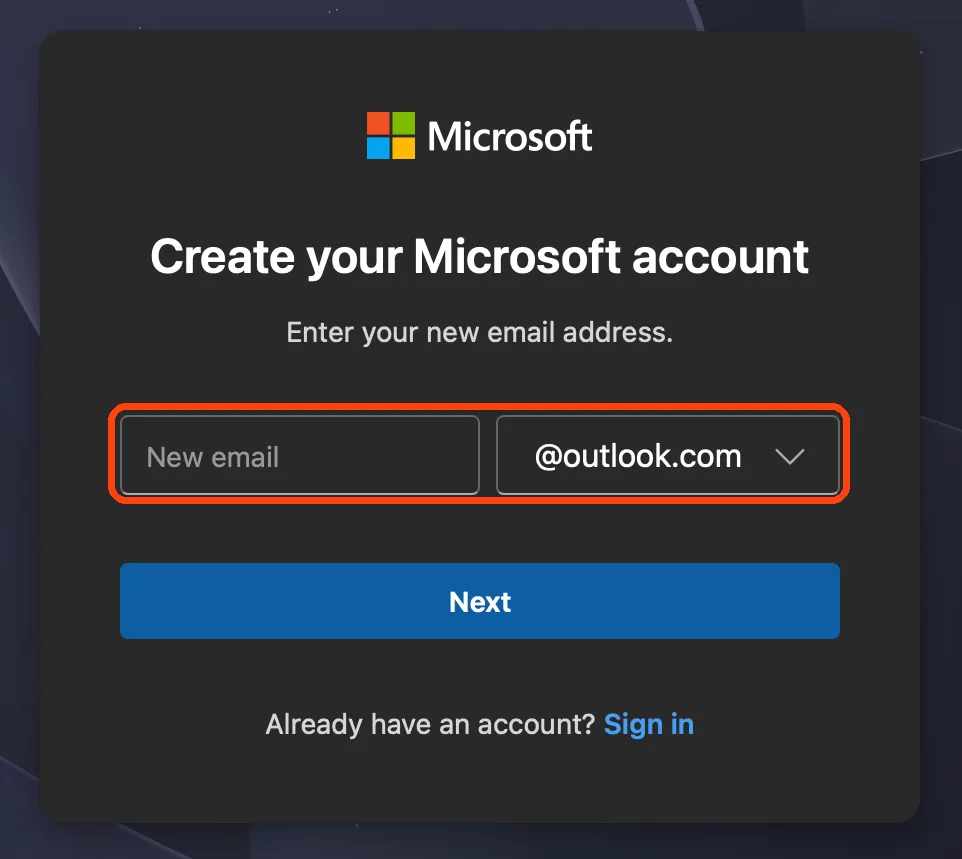
Type the address and choose the ending
Type the part before the @, then choose @outlook.com or @hotmail.com from the list next to it, and select Next. Both endings work the same way. If the address is taken, you see a message straight away and try another.
-
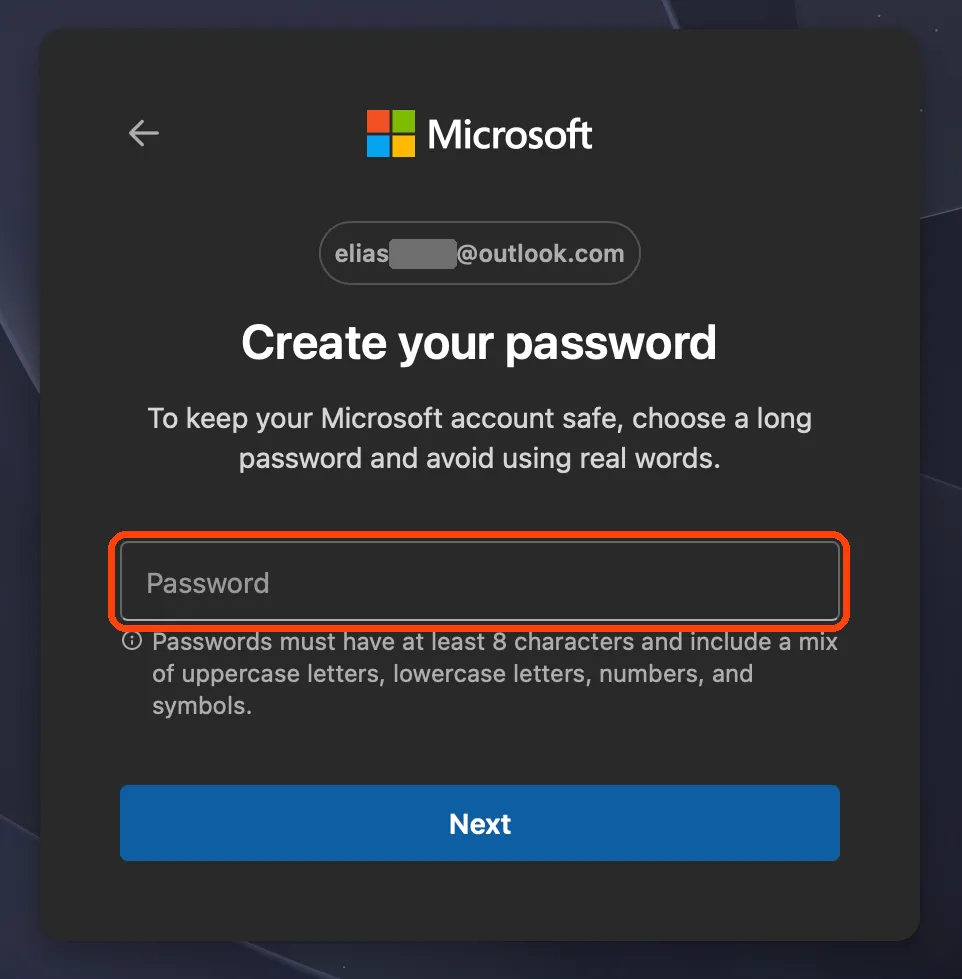
Set a password
Enter a password you do not use anywhere else and select Next. It needs at least 8 characters with a mix of upper and lower case letters, numbers and symbols. This password signs you in to every Microsoft service, not only email, so a strong one matters more than usual.
-
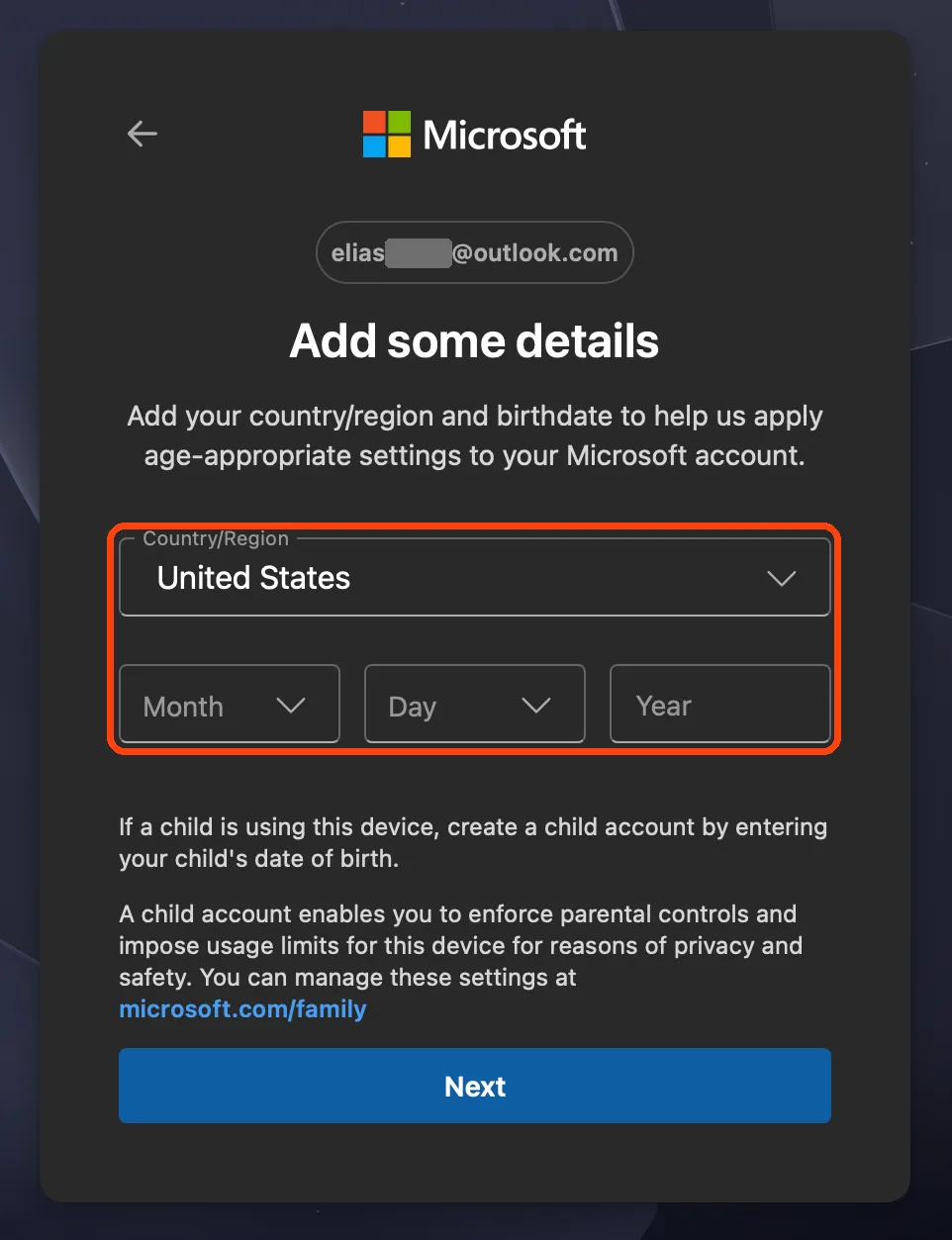
Tell Microsoft who you are
Add your country or region and date of birth
Choose your country or region and enter your date of birth, then select Next. If the date shows you are a child, a parent or guardian has to sign in to finish setting up the account.
-
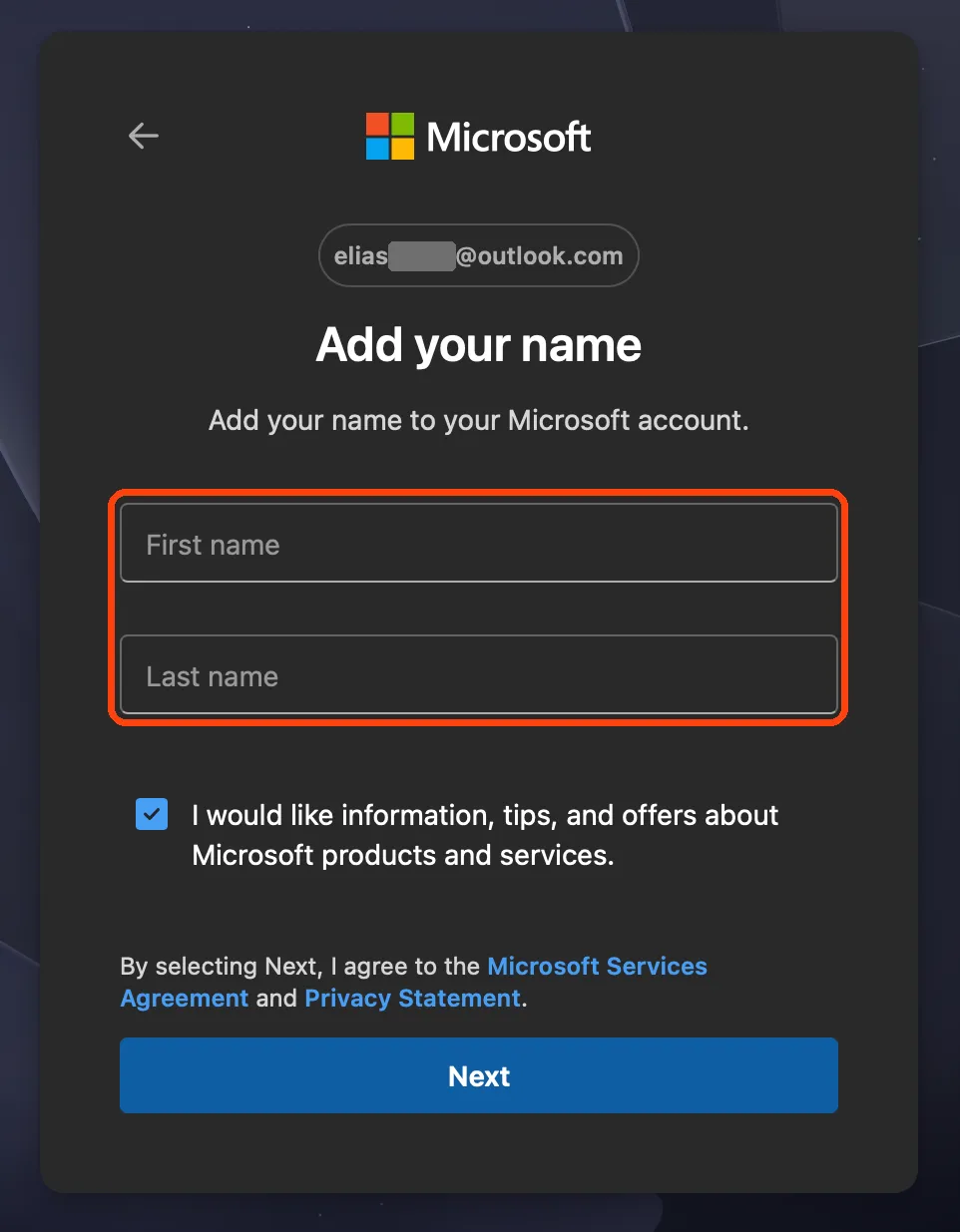
Enter your name
Type your first and last name. This is the name people see when you send them an email, and you can change it later in your account settings. The box for Microsoft offers below the name is ticked already; untick it if you do not want marketing email, then select Next.
-
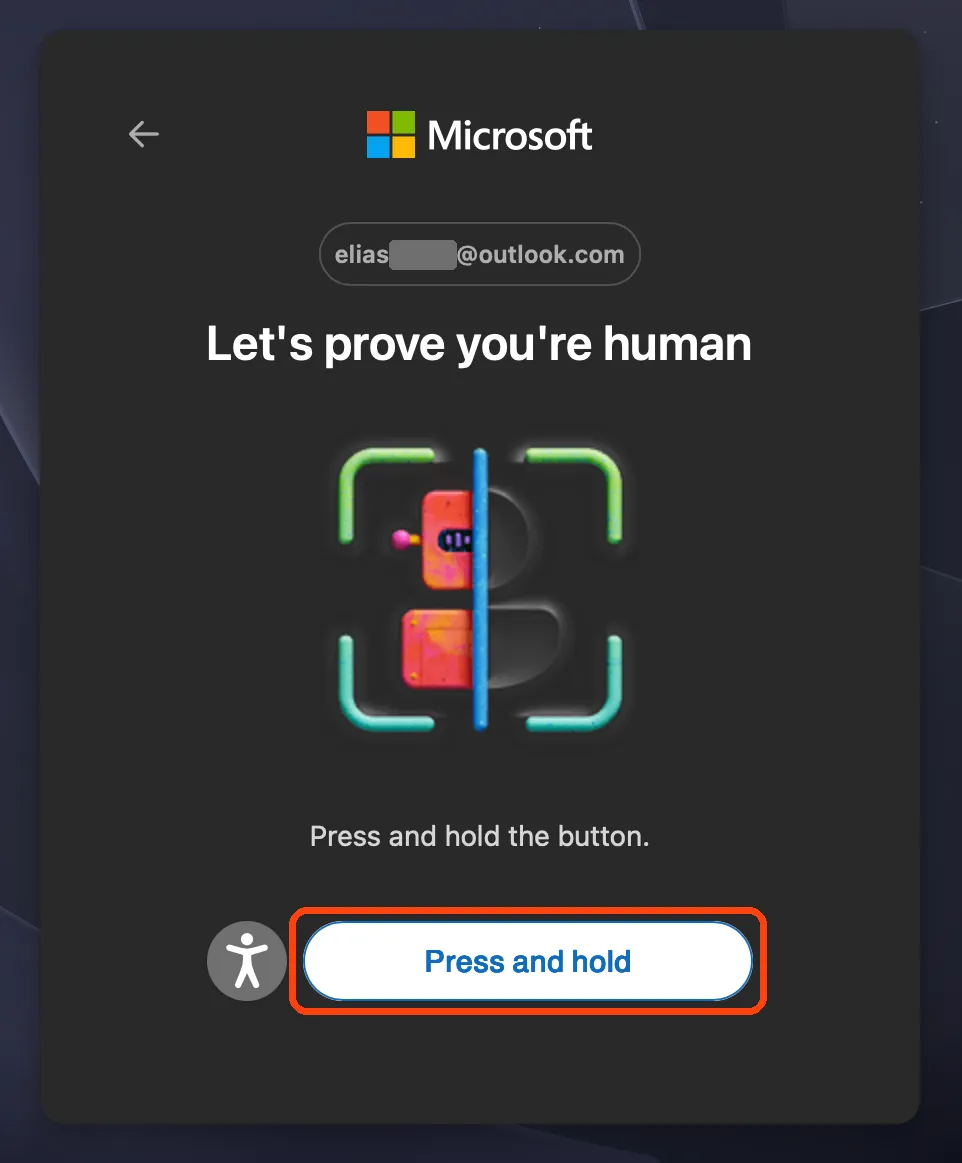
Press and hold to show you are a person
Microsoft asks you to prove you are human. Press and hold the Press and hold button until it finishes; the accessibility icon beside it offers an audio alternative. When you finish, your new Outlook.com inbox opens in the browser.
A common choice is a plain name address for job applications, such as sam.patel.work@outlook.com, kept separate from the address you use for shopping and newsletters.
The address is the one thing you cannot change later without starting again, so settle it before you move on to the password.

More about Outlook
Microsoft’s email and calendar app, for personal and work accounts.
If sign-up gets stuck
- The address you want is not available
Someone has it, or had it once. Microsoft never reuses an address, even from an account closed long ago. Add a word or a period, or try the other ending.
- The human check keeps failing
Use the accessibility icon beside Press and hold for the audio version, or reload the page and start again. A private window without browser extensions often helps.
- Sign-up stops and asks for a parent
The date of birth makes the account a child account, so a parent or guardian must sign in to approve it.
- You meant to use an existing email instead
Microsoft accounts can also use an address you already have, such as Gmail, but then you get no Outlook.com inbox. To have an Outlook.com address, create a new one as above.
What a free Outlook.com account includes
An Outlook.com address is a full Microsoft account. The same sign-in opens these on any device.
| You get | Details |
|---|---|
| Outlook.com inbox, calendar and contacts | |
| Mailbox storage | 15 GB for messages, contacts and calendar |
| Cloud storage | 5 GB, shared by OneDrive files, photos and email attachments |
| Office on the web | Free Word, Excel and PowerPoint in a browser |
| Other services | Microsoft Rewards and the Xbox network |
You do not need Microsoft 365 for any of it. The paid plan adds desktop apps and 1 TB of storage, which most new accounts never need.
Two storage limits, and why mail can stop
Outlook.com counts storage in two separate places, and this catches people out.
- Mailbox storage, 15 GB: the text of your emails, your contacts and your calendar.
- Cloud storage, 5 GB: your OneDrive files and photos, and the attachments in your email.
If either one is full, you cannot send or receive email. A OneDrive full of phone photos can stop your inbox even when the mailbox itself is far from 15 GB.
Keep an eye on both numbers; the 5 GB of cloud storage usually fills first.
Outlook.com or Gmail?
Both are free and both work well. The choice usually comes down to which other services you use.
| Outlook.com | Gmail | |
|---|---|---|
| Comes with | A Microsoft account: Word, Excel, OneDrive, Xbox | A Google Account: Drive, Docs, YouTube, Android |
| Free storage | 15 GB mail plus 5 GB cloud | Up to 15 GB shared by Gmail, Drive and Photos |
| Old addresses | Never reused | Never reused |
If you already use Windows and Office, Outlook.com fits naturally. If you use an Android phone or Google Docs, the Gmail sign-up guide is the better starting point.
Your new address is ready
The sign-up takes five minutes and gives you a Microsoft account as well as an inbox.
Choose an address you will keep, use a password you use nowhere else, then add a phone number or second email for recovery. Once mail starts arriving, scheduling an email in Outlook and recovering deleted Outlook mail cover the next things most people need.
Outlook.com sign-up questions
- Is an Outlook.com email address free?
- Yes. A personal Outlook.com account costs nothing and includes 15 GB of mailbox storage, 5 GB of cloud storage and the web versions of Word, Excel and PowerPoint.
- What is the difference between @outlook.com and @hotmail.com?
- Only the ending. Both are Outlook.com accounts with the same inbox, storage and features. Choose whichever you prefer people to see.
- Can I change my Outlook.com address later?
- You can add another address to the same account as an alias, but the address you sign up with stays in use for your account. Microsoft never gives a used address to anyone else.
- Do I need a phone number to sign up?
- The main sign-up asks for your country, date of birth and name, then a quick check that you are human. Adding a phone number or a second email afterwards is how you get back in if you forget the password.
Share this guide
Link copied
Was this guide helpful?
What was missing?
Thanks, that helps us.
Test log
Followed the steps? Tell us how it went on your device. Entries appear here after we check them.
- Worked Every step, start to finish · Marta Kowalczyk Team
I tested this
Steps performed and confirmed 15 days ago
When you need this
If you want a free email address that is not Gmail, or need a Microsoft account for Windows, Office or Xbox, an Outlook.com address gives you both.
- Describes
- outlook.com in a desktop or mobile browser · Personal Microsoft accounts
- Takes
- About five minutes
- Platforms
- Web
- Published
- 8 October 2026
- Facts checked
- 7 October 2026
Steps repeated and verified by  Marta Kowalczyk
on
Marta Kowalczyk
on
- Marta Kowalczyk: the web steps on a MacBook Air (macOS 27.0.1).
Limits quoted here come from Outlook’s documentation and were not tested.
Sources: Microsoft Support, How to create a new Microsoft accountMicrosoft Support, Microsoft storage quotas
Part of How to create an account in popular apps .

 Outlook
 Gmail
Gmail